Give to your church
For church members: give by card or bank transfer in the app, and see your giving history.
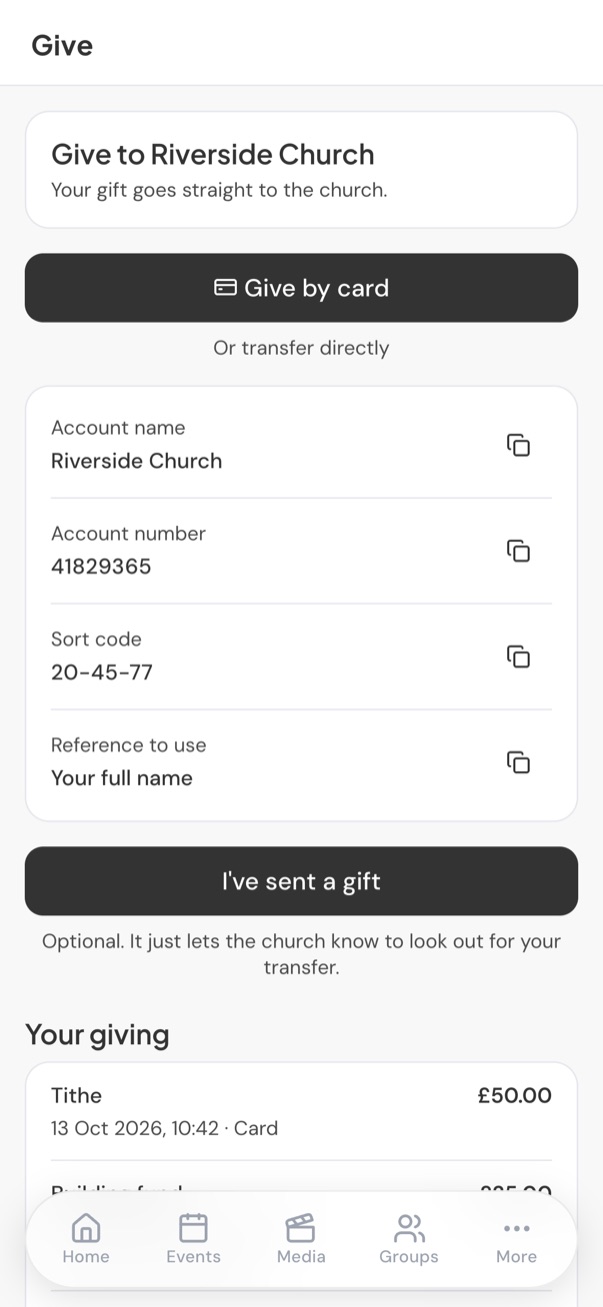
Go to More > Give, or tap Give on the home screen. Your gift goes straight to your church; ChurchStack never holds the money.
If you see Giving isn’t set up yet, your church has not added its details yet. Please speak to the church office.
Give by card
- Tap Give by card.
- Enter the Amount and choose What it’s for, for example Tithe or Offering.
- Tap Continue to payment. A secure payment page opens. ChurchStack never sees your card details.
- When you have paid, you are brought back to the app and see a thank-you message.
Give by bank transfer
- Under Or transfer directly, you will see your church’s bank details and the reference to use. Tap any detail to copy it.
- Make the transfer from your own banking app, using the reference so the church knows it is from you.
- Optionally, tap I’ve sent a gift, enter the amount, what it is for and when you sent it, and tap Let the church know. This does not take any money; it helps the office match your gift when it arrives.
Your giving
The bottom of the Give screen lists your gifts. A transfer you told the church about shows as waiting until the office confirms it has arrived.
Still stuck?
Contact support Tell us what you were trying to do and we will help.