Events and RSVPs
For church members: see what is on, reply to events, join online meetings and register.
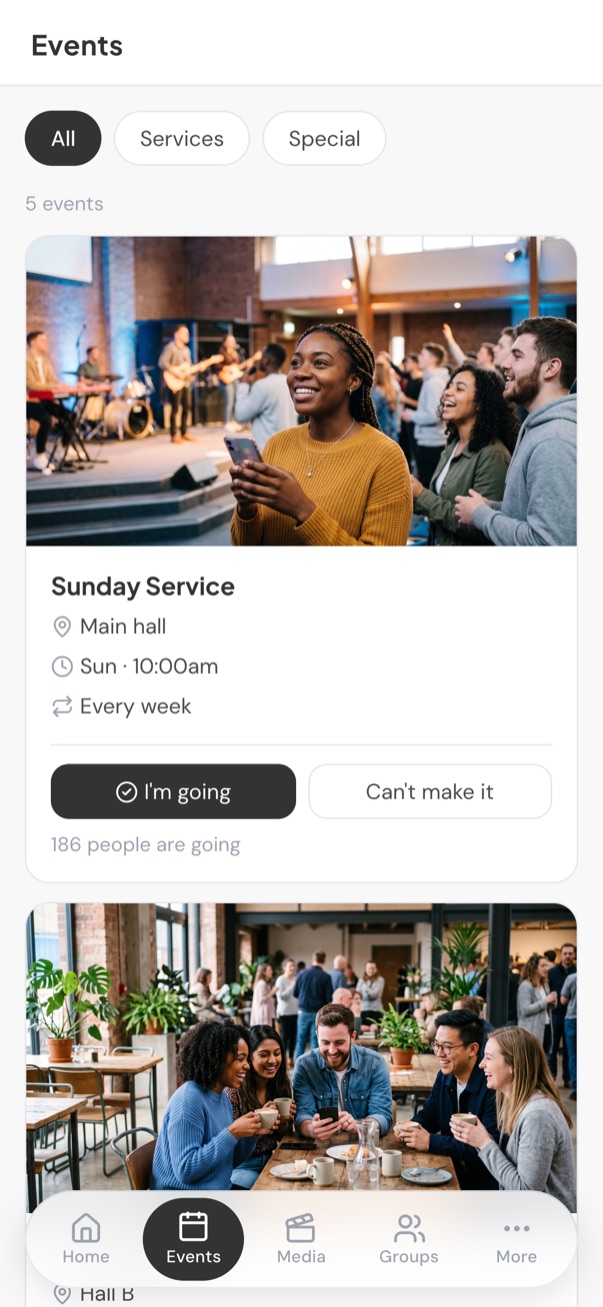
The Events tab lists upcoming services and events. Use the tabs at the top to show All, Services or Special events.
Tap an event to see:
- The time and location, with directions, or how to join online.
- If it repeats, how often, and the upcoming dates. Any date that has been moved or cancelled is marked.
- A description and any flyer.
Reply to an event
If your church wants to know numbers, the event shows I’m going and Can’t make it. Tap one to reply. You can change your mind later. The event also shows how many people are going.
Online events
When an online event is about to start, a Join now button appears. It opens the meeting link (for example Zoom or Teams).
Register
Some events need you to register. Tap Register to open the church’s registration page.
Share
Tap Share to send the event to a friend.
Still stuck?
Contact support Tell us what you were trying to do and we will help.