Giving that goes straight to the church.
Members give by card or bank transfer from the app, and every gift lands in your church’s own account. Count the Sunday offering, confirm transfers and send year-end statements, all from the same records.
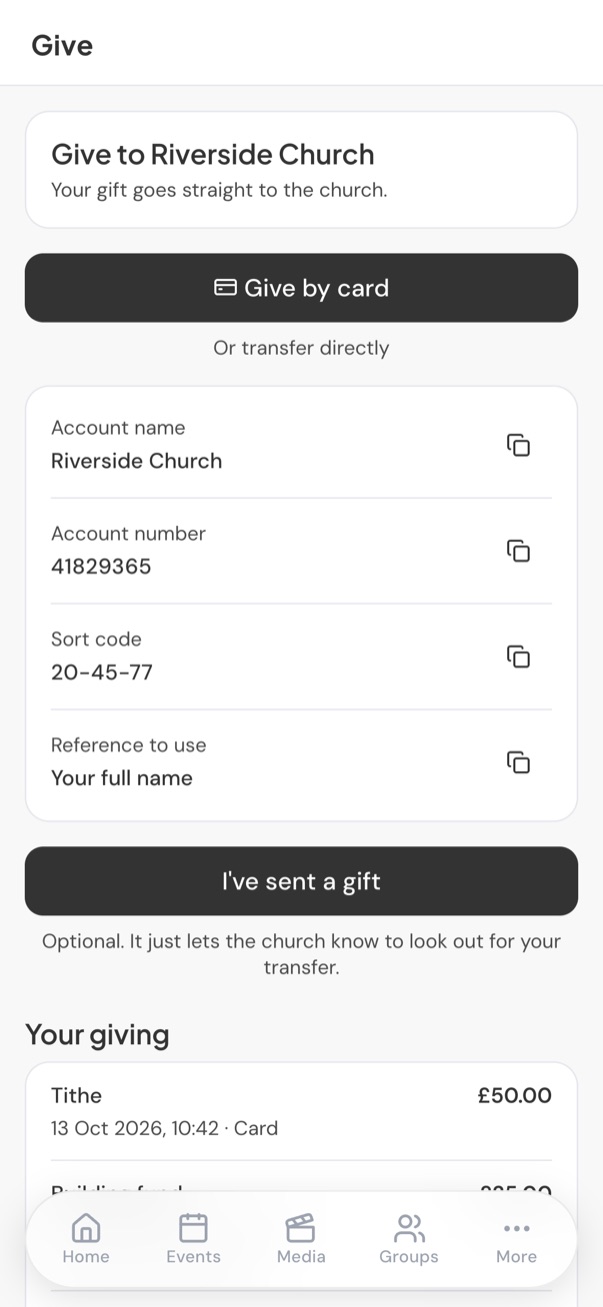
Two ways to give, both easy.
By card: members choose an amount and a fund, then pay on your church’s secure payment page, with Apple Pay and Google Pay where their phone supports it.
By bank transfer: your account details with a copy button on each, and the reference to use. Members can tell you they have sent a gift, so your office knows to look out for it.
- Paid into your own account through Stripe or Paystack
- ChurchStack takes nothing; the payment provider charges its usual fee
- Members see their own giving, with dates and how they gave

Every gift accounted for.
Card gifts are recorded the moment they are paid. Bank transfers that members tell you about wait in a short list for someone to confirm against the bank statement. Cash and envelopes go through a proper offering count.
- Offering counts with each envelope kept against the person who gave it
- Year-end statements for every giver, ready to download
- Refunds from the giving list, with a clear warning first
- CSV import of bank or Stripe exports, matched to your people
| Tithe | £1,440.00 |
| Building fund | £300.00 |
| Missions | £120.00 |
| Total | £1,860.00 |
Confirmed gifts only. Refunded gifts are left out.
Simple books for a church office.
ChurchStack is not full accounting software, and does not pretend to be. It keeps the records a church office needs, cleanly.
Funds and categories
Tithe, offering, building fund, missions: give each its own fund and see them separately.
Expenses
Record spending against categories, with receipts, so the year adds up.
Who sees money
Finance has its own permission, so only the people you choose see what anyone gives.